Skip to content
Linari logo

Linari

Book a Demo

User

7
  • Login
  • Profile
  • Change Image
  • Change Password
  • Culture
  • Template
  • Exit (Logout)

User menu

2
  • Search
  • Favorite

Navigation

10
  • Filter
  • Date
  • Text and Number
  • List
  • Order
  • Navigation Bar
  • Download Report
  • Select Rows
  • Create New View
  • Switch Between Views

MasterData

12
  • Sender
  • Product
  • Type Code
  • Product grouping
  • Orderer
  • Supplier
  • Owner
  • Warehouse
  • Storage Group
  • Worker
  • Driver
  • Delivery Planning

Receiving Management

10
  • Purchase Order
  • Receiving Order
  • Receiving
  • Receiving Worker Assign
  • Receiving Count
  • Receipt Create
  • Receipt
  • Putaway Worker Assign
  • Putaway Complete
  • Return from Store

Shipping Management

12
  • Shipping Order
  • Picking Location Assign
  • Picking Worker Assign
  • Picking Finish
  • Checking
  • Consolidation
  • Dispatch
  • POD
  • Invoice
  • Return to Supplier
  • Pallet Manifest
  • Waybill

Inventory Management

10
  • Inventory
  • Inventory Turneover
  • Location Inventory
  • Location Turnover
  • Inventory With Location
  • Location Transfer
  • Replenishment
  • OnHand
  • Inventory Modify
  • Cycle Count

Receiving Report

4
  • Purchase Order Report
  • Receiving Detail
  • Receiving Task
  • Putaway Task

Shipping Report

4
  • Picking Task
  • Invoice Detail Report
  • Shipping Order Detail
  • Pallet Manifest Report

Pallet Management

5
  • Pallet Type
  • Pallet Inventory
  • Pallet Modify
  • Pallet Transfer
  • Pallet History

Integeration

7
  • Product (Integrated)
  • Supplier (Integrated)
  • PO Received (Integrated)
  • PO Sent (Integrated)
  • Store (Integerated)
  • LPO Received (Integrated)
  • LPO Sent (Integerated)
View Categories
  • Home
  • Docs
  • MasterData
  • Type Code

Type Code

< 1 min read

Each product can be offered in different packaging therefore it is necessary to register and maintain all types of packaging related to each product

Type Code,  linari, www.linari.app, wms, Warehouse, Type Code, information, Type Code submenu.

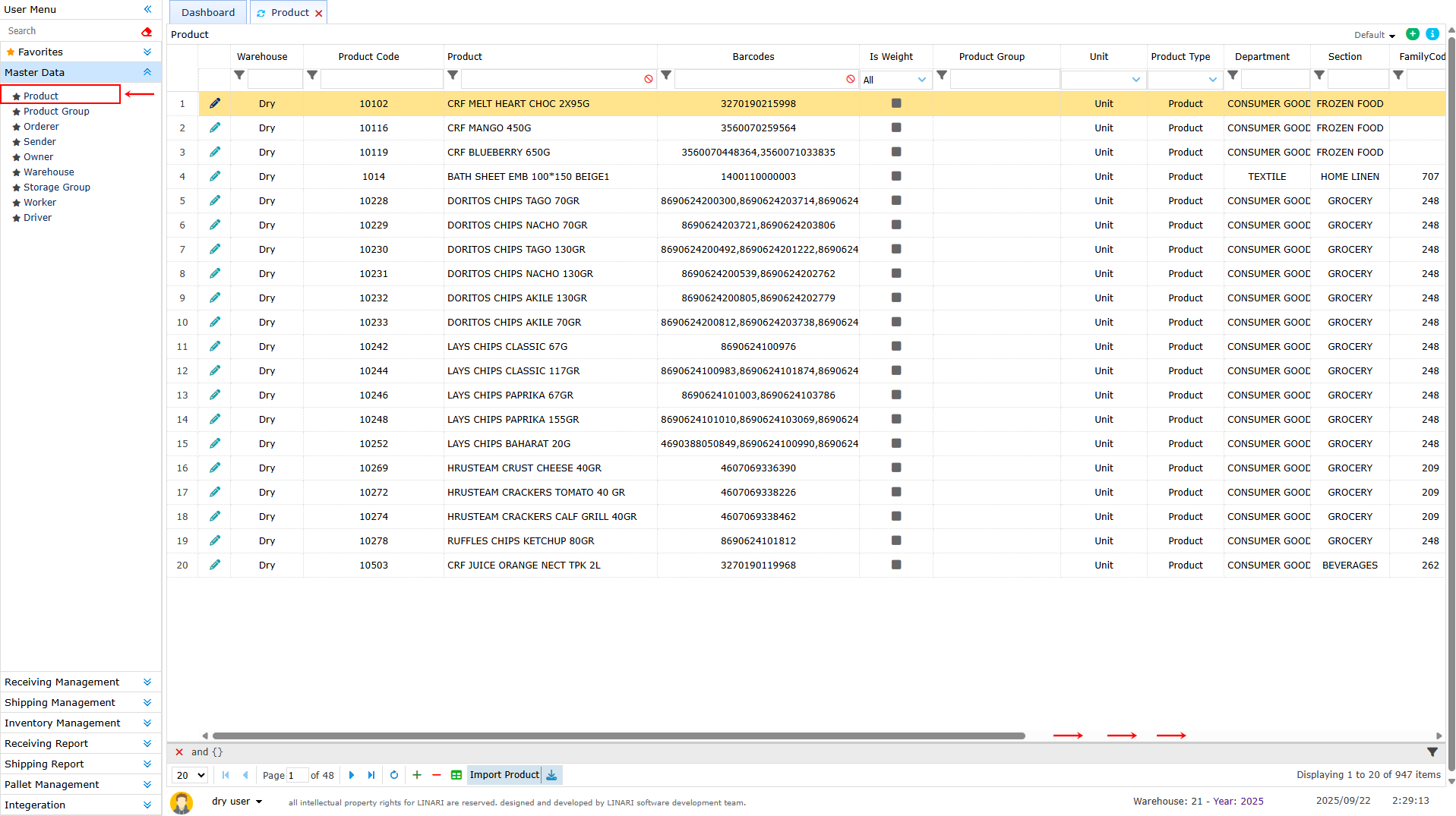
To do this we go to the product page
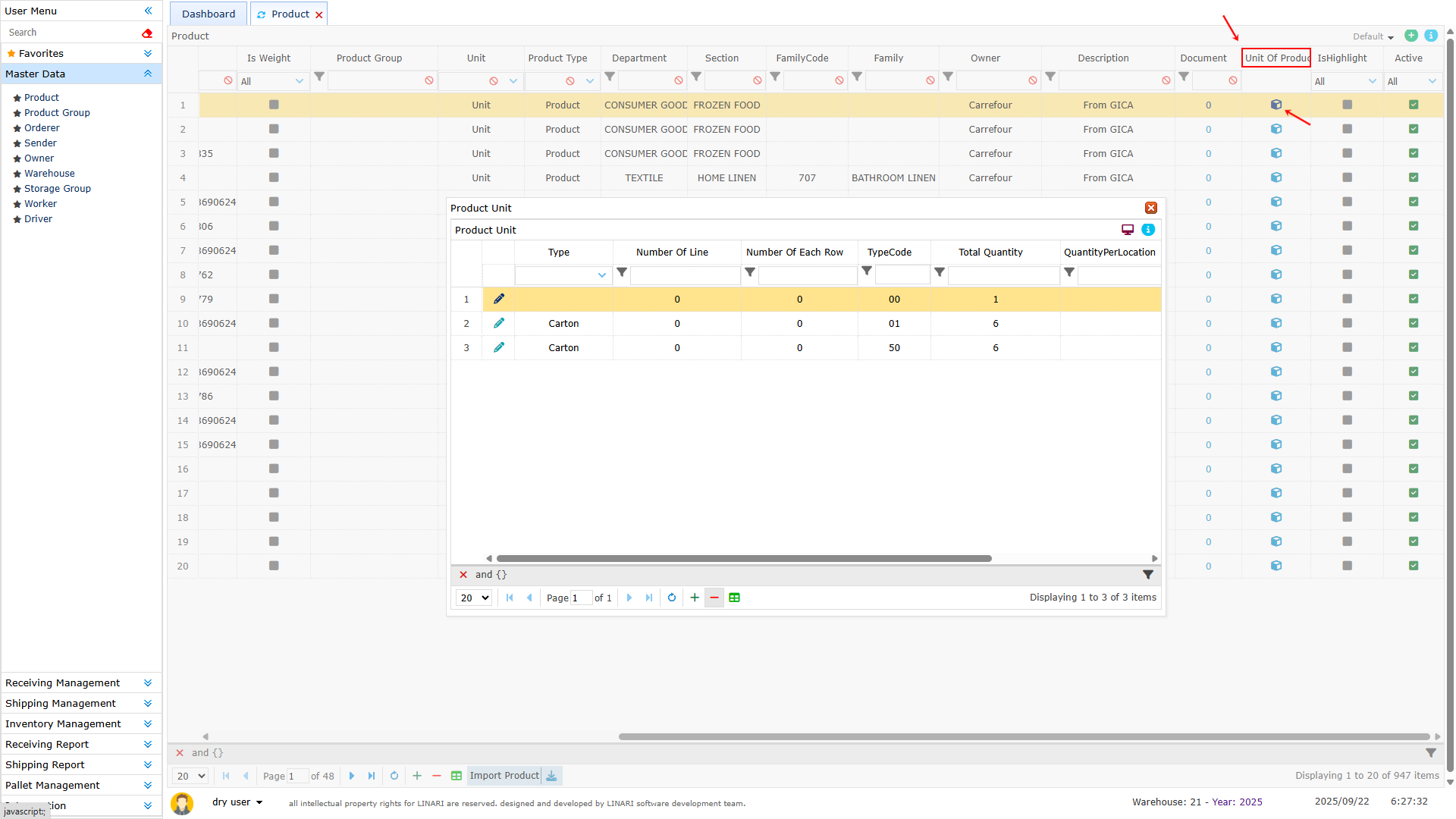
First we select the desired product and then scroll forward to click on the Unit of produce column
In the opened page a list of product units will be displayed
Type Code,  linari, www.linari.app, wms, Warehouse, Type Code, information, Type Code submenu.

Type Code,  linari, www.linari.app, wms, Warehouse, Type Code, information, Type Code submenu,  add a new unit to the product.

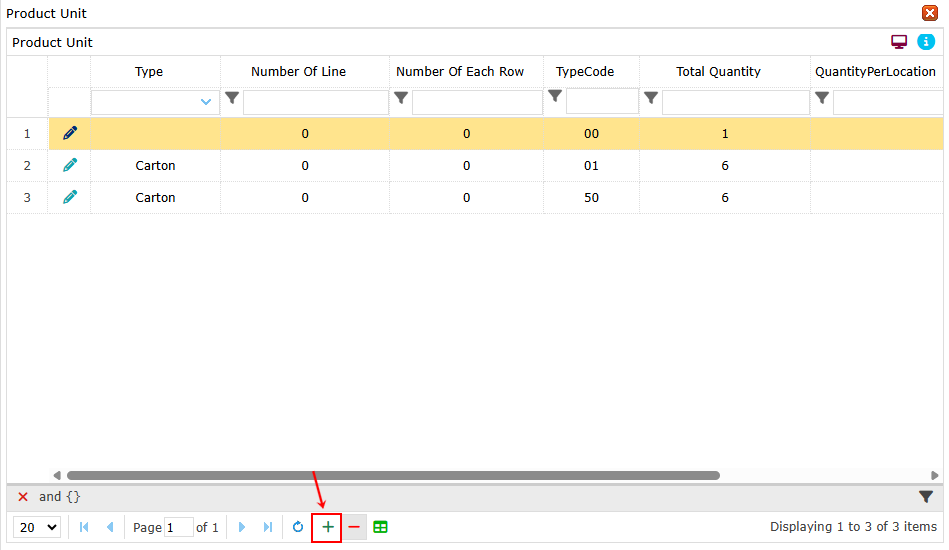
To add a new unit to the product first click on the + button and a form will open In the Type section select and register the type of product
Type Code,  linari, www.linari.app, wms, Warehouse, Type Code, information, Type Code submenu,  add a new unit to the product.

In the Total Quantity section enter the number of products
In the Type code section enter the desired code
At the end click on Save and the information will be stored
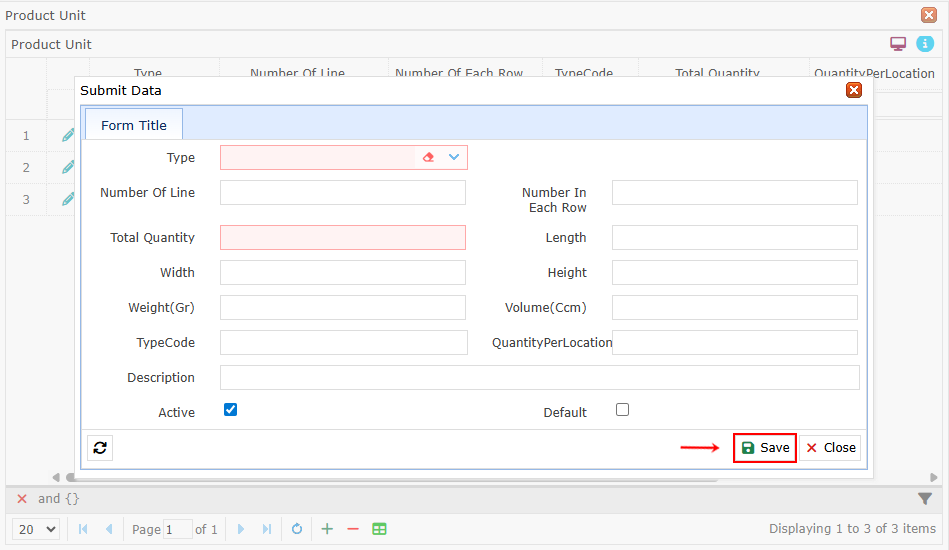
Type Code,  linari, www.linari.app, wms, Warehouse, Type Code, information, Type Code submenu,  add a new unit to the product, Total Quantity section enter the number of products

Next to each row the Edit button will be displayed By clicking on the Edit button the form will open and we can edit the required information After changes click on Save and it will be updated.
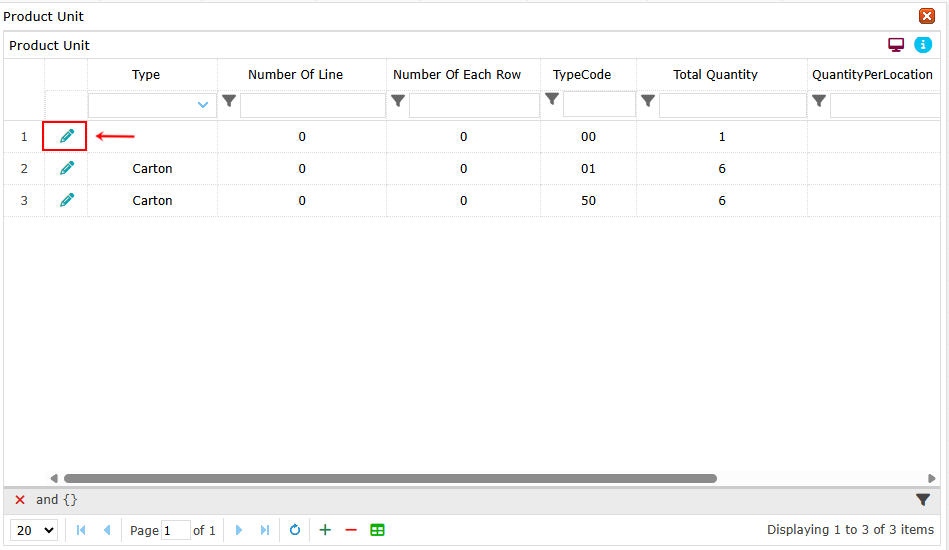
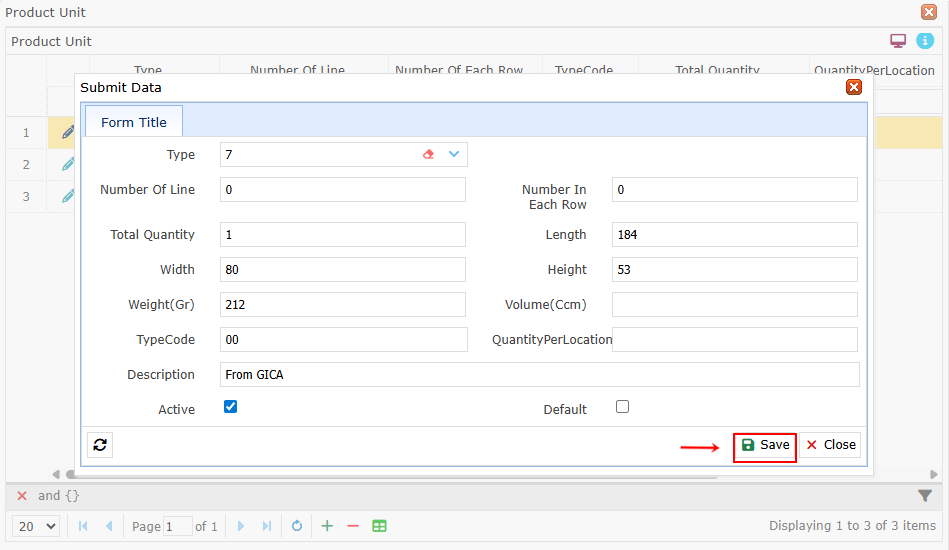
Type Code,  linari, www.linari.app, wms, Warehouse, Type Code, information, Type Code submenu, edit the required information

Type Code,  linari, www.linari.app, wms, Warehouse, Type Code, information, Type Code submenu, edit the required information

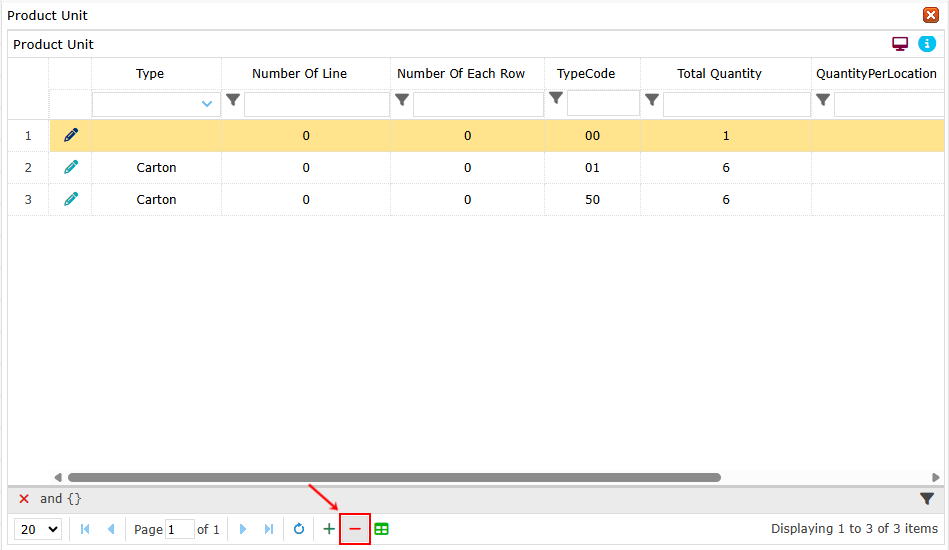
To delete a row use the – button

Type Code,  linari, www.linari.app, wms, Warehouse, Type Code, information, Type Code submenu, delete  the required information

Leave a Reply Cancel reply

Your email address will not be published. Required fields are marked *

Linari
  • Home
  • Services
  • Docs
  • About us
  • Contact us
  • Company Profile

All rights reserved

Loading...

User

  • Login
  • Profile
  • Change Image
  • Change Password
  • Culture
  • Template
  • Exit (Logout)

User menu

  • Search
  • Favorite

Navigation

  • Filter
  • Date
  • Text and Number
  • List
  • Order
  • Navigation Bar
  • Download Report
  • Select Rows
  • Create New View
  • Switch Between Views
betterdocs-category-icon

MasterData

  • Sender
  • Product
  • Type Code
  • Product grouping
  • Orderer
  • Supplier
  • Owner
  • Warehouse
  • Storage Group
  • Worker
  • Driver
  • Delivery Planning
betterdocs-category-icon

Receiving Management

  • Purchase Order
  • Receiving Order
  • Receiving
  • Receiving Worker Assign
  • Receiving Count
  • Receipt Create
  • Receipt
  • Putaway Worker Assign
  • Putaway Complete
  • Return from Store
betterdocs-category-icon

Shipping Management

  • Shipping Order
  • Picking Location Assign
  • Picking Worker Assign
  • Picking Finish
  • Checking
  • Consolidation
  • Dispatch
  • POD
  • Invoice
  • Return to Supplier
  • Pallet Manifest
  • Waybill
betterdocs-category-icon

Inventory Management

  • Inventory
  • Inventory Turneover
  • Location Inventory
  • Location Turnover
  • Inventory With Location
  • Location Transfer
  • Replenishment
  • OnHand
  • Inventory Modify
  • Cycle Count
betterdocs-category-icon

Receiving Report

  • Purchase Order Report
  • Receiving Detail
  • Receiving Task
  • Putaway Task
betterdocs-category-icon

Shipping Report

  • Picking Task
  • Invoice Detail Report
  • Shipping Order Detail
  • Pallet Manifest Report
betterdocs-category-icon

Pallet Management

  • Pallet Type
  • Pallet Inventory
  • Pallet Modify
  • Pallet Transfer
  • Pallet History
betterdocs-category-icon

Integeration

  • Product (Integrated)
  • Supplier (Integrated)
  • PO Received (Integrated)
  • PO Sent (Integrated)
  • Store (Integerated)
  • LPO Received (Integrated)
  • LPO Sent (Integerated)

Insert/edit link

Enter the destination URL

Or link to existing content

    No search term specified. Showing recent items. Search or use up and down arrow keys to select an item.